Why I Hated Traditional EQs
I've been messing around with audio production for years, and I've always had this love-hate relationship with equalizers. They're powerful tools, but they're also kind of... terrible? You're looking at a bunch of frequency sliders, trying to figure out which one makes your mix sound less muddy, and you're basically working blind.
The problem is that traditional EQs treat frequency as a one-dimensional thing. You boost or cut at 1kHz, and that's it. But sound isn't one-dimensional. It has timbre, it has spatial characteristics, it has texture. When you're mixing, you're not just adjusting frequencies:you're shaping how sound feels in space.
So I built Timbre Space EQ. It's a 3D audio editor that lets you actually see and manipulate sound in a spatial way. Instead of just frequency sliders, you get a 3D space where you can position and shape your audio.
The "Aha" Moment
The idea came to me while I was working on a project and struggling with a mix. I was trying to separate two instruments that were fighting for the same frequency space, and I kept thinking: "I wish I could just see where these sounds are in space and move them apart."
That's when it clicked. What if we treated audio editing like 3D modeling? What if instead of frequency bands, we had a spatial representation where you could position sounds, stretch them, rotate them, and see how they interact with each other?
The technical challenge was mapping audio characteristics to 3D space in a way that actually makes sense. I ended up using a combination of spectral analysis, timbre extraction, and spatial audio processing to create a representation where:
- The X-axis represents frequency content
- The Y-axis represents timbral characteristics (brightness, warmth, etc.)
- The Z-axis represents spatial positioning and depth
What Makes It Different
Traditional EQs are reactive. You hear something wrong, you guess which frequency might be the problem, you adjust, you listen again, and you repeat until it sounds okay (or you give up). It's a lot of trial and error.
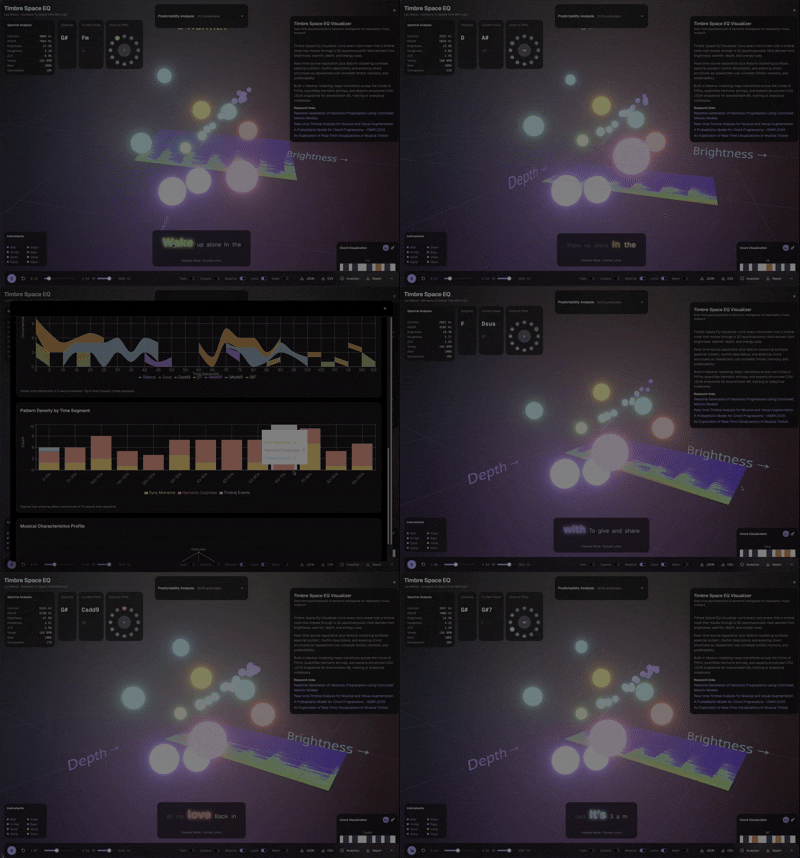
With Timbre Space EQ, you can see the problem. Two sounds overlapping in the same space? You can literally see them colliding and move them apart. Want to add more warmth to a vocal? You can see the timbral space and push it in the right direction. It's visual, intuitive, and way faster than the old way.
The interface uses WebGL for real-time 3D rendering, so you get smooth interactions and immediate visual feedback. You can rotate the view, zoom in on specific regions, and manipulate sounds with direct mouse/touch controls. It feels more like sculpting than mixing.
The Technical Deep Dive (For the Nerds)
Under the hood, it's doing real-time FFT analysis to extract spectral features, then using machine learning models to map those features to timbral characteristics. The spatial positioning comes from analyzing phase relationships and stereo imaging.
The tricky part was making sure the 3D representation actually corresponds to how we perceive sound. I spent a lot of time testing with different audio sources and tweaking the mapping until it felt natural. If you move something "up" in the interface, it should sound brighter. If you move it "forward," it should sound closer. That kind of intuitive mapping was crucial.
I also built in real-time audio processing so you can hear changes as you make them. The Web Audio API handles the actual EQ processing, while the 3D visualization runs separately to keep everything smooth.
Why This Matters
Audio production tools have been stuck in the 1970s. We're still using the same basic interfaces that existed when analog hardware was the only option. But we have computers now. We can do better.
The goal isn't to replace traditional EQs entirely:sometimes you just need a simple high-pass filter. But for complex mixing tasks, especially when you're trying to create space and separation in a mix, having a visual, spatial representation makes a huge difference.
I think this is the direction audio tools need to go. We should be leveraging the power of modern computers to give producers better ways to understand and manipulate sound. If you can see it, you can shape it better.
The Development Journey
Building this wasn't a straight line. The first version was basically just a 3D scatter plot of frequency data. It looked cool, but it wasn't actually useful. The sounds were positioned based on raw FFT data, which didn't correspond to how we actually perceive sound.
I spent weeks tweaking the mapping algorithm. I tried different combinations of spectral features, timbral descriptors, and spatial audio analysis. I tested it with dozens of different audio sources:vocals, drums, guitars, synths, full mixes. Each test revealed something new about how the mapping needed to work.
The breakthrough came when I started thinking about perceptual models. Instead of just using raw frequency data, I started incorporating psychoacoustic models that account for how humans actually hear. Things like critical bands, masking effects, and timbral perception. That's when the 3D space started making intuitive sense.
The WebGL rendering was another challenge. Real-time 3D graphics in the browser can be tricky, especially when you're also doing real-time audio processing. I had to optimize the rendering pipeline, use efficient shaders, and make sure the audio processing didn't block the UI thread. There were a lot of late nights debugging performance issues.
See It in Action
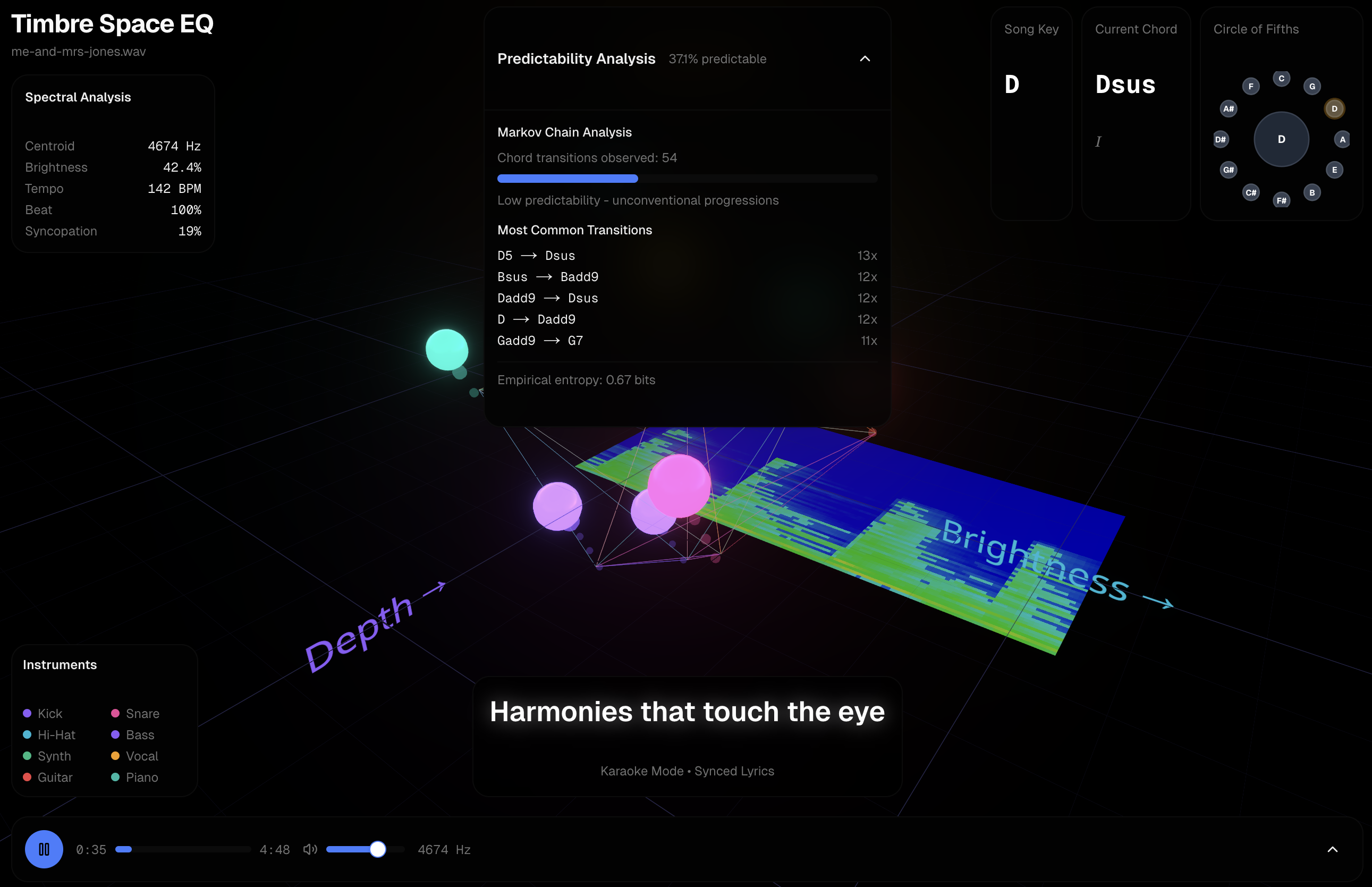
Here are the two key views I show in demos, plus the chord-transition analysis that helps us capture jazz-like nuance for future generative models.

Real-World Use Cases
Since launching, I've gotten feedback from producers who are actually using it. One producer told me they used it to separate a vocal and a synth that were fighting for the same frequency space. Instead of guessing which frequencies to cut, they could see exactly where the overlap was and move the sounds apart visually.
Another user said they used it to add warmth to a vocal track. They could see the vocal sitting in the "bright" region of the timbral space, and by dragging it toward the "warm" region, they got exactly the sound they wanted without the trial-and-error of traditional EQ.
A mixing engineer told me they use it for quick spatial adjustments. Instead of setting up complex reverb and delay chains, they can just move sounds forward or backward in the 3D space to create depth. It's not a replacement for proper spatial effects, but it's a fast way to get a sense of how things should sit in a mix.
These use cases validate the core idea: visual, spatial manipulation of audio is more intuitive than traditional frequency-based editing, at least for certain tasks.
Comparing to Traditional Tools
I'm not saying Timbre Space EQ replaces traditional EQs. Sometimes you just need a simple high-pass filter, and a traditional EQ is perfect for that. But for complex mixing tasks, especially when you're trying to create space and separation, the 3D approach has real advantages.
Traditional EQs are great for surgical cuts:removing a specific frequency that's causing problems. But they're not great for understanding how sounds relate to each other spatially. You can't see that two sounds are overlapping in timbral space until you hear the muddiness in the mix.
Timbre Space EQ flips that. You see the problem first, then you fix it. It's more like working with a visual editor than an audio editor. And for people who think visually (which is a lot of us), that's a huge advantage.
The trade-off is precision. Traditional EQs give you exact frequency control. Timbre Space EQ gives you intuitive spatial control, but you might need to fine-tune with a traditional EQ afterward. That's fine:they're complementary tools, not replacements.
The Technical Challenges
Building real-time audio analysis in the browser is harder than it sounds. The Web Audio API is powerful, but it has limitations. You can't do everything you can do in a native DAW, at least not without serious performance hits.
The FFT analysis runs in a Web Worker to keep it off the main thread. The timbral feature extraction uses a combination of spectral centroid, spectral rolloff, zero-crossing rate, and MFCCs (Mel-frequency cepstral coefficients). The spatial positioning comes from analyzing interaural time differences and phase relationships in stereo signals.
The 3D visualization uses Three.js for the rendering, with custom shaders for the particle effects. Each audio source gets represented as a cloud of particles, with color and size mapped to different audio characteristics. The interaction uses raycasting to detect when you're hovering over or dragging a sound source.
The real-time processing pipeline was the trickiest part. You need to analyze the audio, extract features, map them to 3D space, render the visualization, and apply the EQ changes:all in real-time, without dropping frames or causing audio glitches. It took a lot of optimization to get it smooth.
What I Learned About Audio Perception
Working on this project taught me a lot about how we actually perceive sound. Frequency is just one dimension of audio. Timbre:the "color" or "texture" of a sound:is equally important, but it's much harder to quantify and manipulate.
Timbre is what makes a piano sound different from a guitar playing the same note. It's a combination of harmonic content, attack characteristics, and spectral evolution over time. Traditional EQs can affect timbre, but they do it indirectly by manipulating frequency content. Timbre Space EQ tries to make timbre a first-class dimension that you can manipulate directly.
Spatial perception is another dimension that's often overlooked. We don't just hear frequencies:we hear sounds in space. They have position, depth, width. Traditional EQs don't really address this, but it's crucial for creating realistic, immersive mixes.
By making timbre and spatial characteristics visible and manipulable, Timbre Space EQ gives producers tools that match how we actually think about sound, not just how audio hardware works.
Future Improvements
There's a lot I want to add. Better visualization options:maybe different view modes for different tasks. More precise controls for fine-tuning. Support for multi-track editing, so you can see and manipulate multiple sources at once. Maybe even collaborative editing, so multiple producers can work on a mix together in real-time.
I'm also thinking about adding AI-assisted features. What if the tool could analyze a mix and suggest spatial adjustments? Or automatically separate overlapping sounds? There's a lot of potential here.
The feedback I'm getting is helping shape the direction. Producers want more precision controls. Mixing engineers want better integration with traditional workflows. Sound designers want more creative manipulation options. I'm trying to balance all of these needs.
Why This Matters for Audio Production
Audio production tools have been stagnant for too long. We're still using interfaces designed for analog hardware, even though we're working entirely in the digital domain. That doesn't make sense.
Modern computers can do things that were impossible with analog hardware. We can visualize audio in ways that weren't possible before. We can manipulate sound in dimensions that didn't exist in the analog world. We should be taking advantage of that.
Timbre Space EQ is one attempt to do that. It's not perfect, and it's not going to replace traditional tools. But it shows what's possible when we think about audio editing in new ways. And I think that's valuable, even if the tool itself is still evolving.
Try It Yourself
The tool is live at v0-timbre-space-eq.vercel.app. It works in the browser, no installation needed. Upload an audio file and start playing around with it. Drag sounds around in 3D space. See how it feels.
I'm still iterating on it based on feedback. There are definitely improvements to make:better visualization options, more precise controls, maybe even collaborative editing. But the core idea is there, and I think it's a step in the right direction.
Audio production shouldn't be about memorizing frequency ranges and guessing. It should be about understanding sound and shaping it with intention. That's what I'm trying to build. And if you try it and have feedback, I'd love to hear it. This is a work in progress, and user input is shaping where it goes next.